

three.js
sygnal/three renders a three.js scene from JSX. A <Scene> sits in an ordinary component tree, and its children (<mesh>, <group>, <boxGeometry>, <meshStandardMaterial>, lights, cameras) become THREE objects. The children are elements of your app, so a cube can be a component with its own intent and model, kept in a <Collection>. A click on the canvas is a raycast, and the cube it hits gets a DOM click, so DOM.click('.cube') works as it does for a button.
npm install threethree is an optional peer dependency of sygnal: install it in the app (0.170 or later).
import { Collection } from 'sygnal'import { Scene } from 'sygnal/three'
function Cube({ state }) {  return (    <mesh className="cube" position={[state.x, 0, 0]} scale={state.on ? 1.3 : 1}      role="button" tabIndex={0} aria-pressed={String(state.on)} aria-label={`Cube ${state.id}`}>      <boxGeometry args={[1, 1, 1]} />      <meshStandardMaterial color={state.on ? '#f59e0b' : '#3b82f6'} />    </mesh>  )}
Cube.intent = ({ DOM }) => ({ TOGGLE: DOM.click('.cube') })
Cube.model = {  // the point the raycast hit is on the event (a keyboard click has none)  TOGGLE: (state, event) => ({ ...state, on: !state.on, hitAt: event.point || null }),}
export function Cubes({ state }) {  return (    <section>      <Scene className="viewport" width={640} height={400} background="#10141c">        <ambientLight intensity={0.6} />        <directionalLight position={[3, 5, 4]} intensity={2} />        <perspectiveCamera makeDefault position={[0, 1.5, 6]} lookAt={[0, 0, 0]} />        <Collection of={Cube} from="cubes" />      </Scene>      <p>{state.cubes.filter((cube) => cube.on).length} selected</p>    </section>  )}
Cubes.initialState = {  cubes: [{ id: 1, x: -1.8, on: false, hitAt: null }, { id: 2, x: 0, on: false, hitAt: null }, { id: 3, x: 1.8, on: false, hitAt: null }],}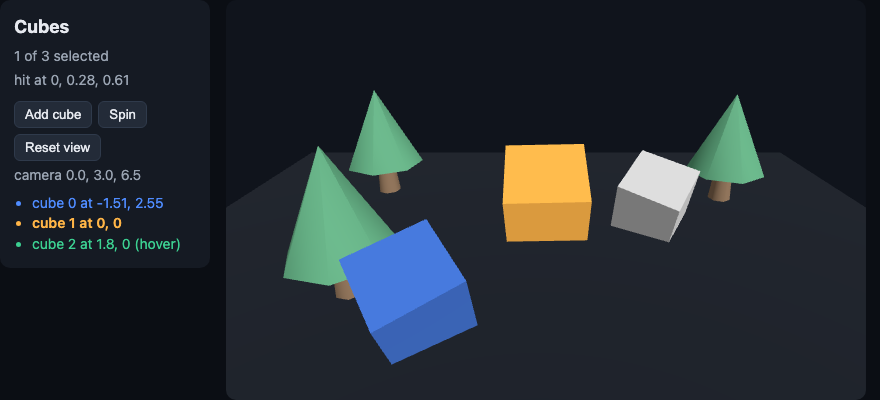
The three-cubes example adds hover, removal, spinning, dragging, a loaded model, an orbit camera and tests.
Tags and props
Section titled “Tags and props”Every three.js class is a tag, lowercased: <mesh>, <group>, <points>, <boxGeometry>, <meshStandardMaterial>, <perspectiveCamera>, <directionalLight>. Classes from three’s add-ons or your own code become tags with extend:
import { extend } from 'sygnal/three'import { TextGeometry } from 'three/addons/geometries/TextGeometry.js'
extend({ TextGeometry }) // <textGeometry args={[...]} />| Prop | What it does |
|---|---|
position={[x, y, z]}, rotation, scale, color, … | Written to the object. A value with .set (a vector, an Euler angle, a color) is set from an array, a number (scale={2}) or a string (color="orange"); anything else is assigned (intensity={2}, visible={false}). A prop that goes away returns to the class’s default |
lookAt={[0, 0, 0]} | A prop named after a method calls it with the array as its arguments |
args={[1, 1, 1]} | The constructor’s arguments. New args make a new object; its children move over |
attach="map" | Where a child goes on its parent. Geometries attach as geometry and materials as material by themselves; on removal the parent gets its previous value back |
animate={{ rotation: (t, dt, object) => [0, t, 0] }} | Per-frame values (below) |
hit={false} | Raycasts pass through the object, as CSS pointer-events: none |
dispose={null} | Don’t dispose the object when its element goes |
makeDefault | This camera renders the scene (else the first camera, else a default one) |
capture, capture="xz" | A press on the object captures the pointer until it goes up (Dragging) |
draggable | The HTML drag events, for processDrag (Dragging) |
className, role, tabIndex, aria-* | The element’s: for intents and for accessibility |
Disposal. An object the scene made from a tag is disposed when its element leaves the view (its geometry, its material: their GPU memory is freed). An object you pass as a prop (geometry={shared}), or place with <primitive object={obj} />, is yours and is never disposed.
Unknown tags pass through. A tag that isn’t a three.js class (a component’s wrapper <div>, a <Collection>) adds nothing to the scene: its children attach to the nearest object above it.
SVG names. <line> and <text> are SVG tags to the JSX pragma. Scene declares line as its own (a widget’s tags), so <line> works in a scene, and the objects get their props as written.
Events
Section titled “Events”The scene raycasts pointer input on its canvas and dispatches the DOM’s events on the element of the topmost object hit:
| Event | When |
|---|---|
pointerover, pointerenter | The pointer moves onto an object (enter doesn’t bubble) |
pointermove | It moves over an object |
pointerdown, pointerup | A button goes down or up over an object |
click | Down and up on the same object (or on two in one group: the click goes to the group, as the DOM does) |
pointerout, pointerleave | The pointer leaves an object, or the canvas |
dblclick, contextmenu | On an object |
The events bubble up the scene’s elements, so DOM.click('.world') on a <group className="world"> hears a click on any mesh in it. Each one carries the intersection as plain data: point (world coordinates), distance, uv, normal, faceIndex, ndc (the pointer in normalized device coordinates), and object (the THREE object hit, for reading; keep it out of state). A click on empty space hits nothing; the canvas still gets the browser’s own event.
Only the topmost hit is a target, as in the DOM. (react-three-fiber instead calls handlers on every object along the ray until one stops it.)
Loading models and textures
Section titled “Loading models and textures”<Model> places a loaded model and <Texture> a loaded texture. Wrap the part that loads in <Suspense> for a fallback until it arrives:
import { Suspense } from 'sygnal'import { Scene, Model, Texture } from 'sygnal/three'
export function Garden({ state }) {  return (    <Scene className="viewport" width={640} height={400}>      <ambientLight intensity={0.8} />      <mesh rotation={[-Math.PI / 2, 0, 0]}>        <planeGeometry args={[10, 10]} />        <meshStandardMaterial>          <Texture src="/textures/grass.jpg" />        </meshStandardMaterial>      </mesh>      <Suspense fallback={<mesh><coneGeometry args={[0.5, 1.2]} /><meshBasicMaterial wireframe /></mesh>}>        {state.trees.map((tree) => <Model key={tree.id} src="/models/tree.glb" className="tree" position={tree.at} />)}      </Suspense>    </Scene>  )}
Garden.initialState = { trees: [{ id: 1, at: [-2, 0, 0] }, { id: 2, at: [2, 0, -1] }] }
<Model src>loads.glband.gltffiles with three’s GLTFLoader, whichsygnal/threeimports the first time a model needs it (a separate chunk in your build). Each<Model>places its own clone of the model’s scene, so the same model can stand in many places; the clones share the geometries and materials. It takes the props any scene element does:position,rotation,scale,className,role, and children.<Texture src>loads an image with THREE.TextureLoader (in the sRGB color space, for color maps) and attaches it to its parent asmap. Giveattach="normalMap"(or any other key) to put it elsewhere.- Any loader.
loader={OBJLoader}takes a loader class;loader={gltfLoader}takes a configured instance (a GLTFLoader with a DRACOLoader).<Model>places whatever the loader returns as an object (or its.scene);<Texture>attaches the value, so an STL geometry or an HDR environment works too (<Texture src="/env.hdr" loader={RGBELoader} attach="environment" />under the scene’s root).
Suspense. The load starts while the view renders, before the scene draws anything. A <Suspense> boundary inside the <Scene> (above) shows a 3D fallback in place of the part that is loading, and the rest of the scene is there at once. A boundary around the whole <Scene> shows an ordinary fallback (<p>Loading…</p>) and creates the scene once everything has loaded. Without a boundary, the scene starts empty where the model goes and the model appears when it arrives.
The cache. A load is shared by every element that names the same URL with the same loader, in any scene on the page: two scenes with the same model fetch it once. When the last element using an asset leaves the view, its geometries, materials and textures are disposed and it leaves the cache; a model that is shown again is loaded again. Model.preload(src) starts a load ahead of time (on hover, at startup), and Model.clear(src) forgets one (so a failed load is tried again on the next render).
Errors. A load that fails is an error of the view that names it: its component’s onError renders, with could not load /models/tree.glb: … as the message.
Garden.onError = (error) => <p className="error">{error.message}</p>Dragging
Section titled “Dragging”Give an object capture and a press on it captures the pointer, as setPointerCapture does in the DOM. Until the button goes up, pointermove and pointerup go to that object wherever the pointer is: off the object, off the canvas. Each captured event’s point is on a drag plane through the point the pointer went down on, and delta is how far it has moved on that plane:
export function Piece({ state }) {  return (    <mesh className="piece" capture="xz" position={[state.x, 0.5, state.z]}>      <boxGeometry />      <meshStandardMaterial color={state.from ? '#ffb547' : '#4f8cff'} />    </mesh>  )}
Piece.intent = ({ DOM }) => ({  GRAB: DOM.select('.piece').events('gotpointercapture'),  DRAG: DOM.select('.piece').events('pointermove').filter((event) => event.captured),  DROP: DOM.select('.piece').events('lostpointercapture'),})
Piece.model = {  GRAB: (state) => ({ ...state, from: [state.x, state.z] }),  DRAG: (state, event) => ({ ...state, x: state.from[0] + event.delta[0], z: state.from[1] + event.delta[2] }),  DROP: (state) => ({ ...state, from: null }),}
capture | The drag plane |
|---|---|
capture="xz" | Horizontal (the ground): the object slides along the floor |
capture="xy", capture="yz" | Vertical, facing the z or the x axis |
capture | Facing the camera: the object follows the pointer on the screen |
- The capture begins with
gotpointercaptureand ends withlostpointercaptureon the object, as in the DOM. A captured event carriescaptured: true,point,delta,ray(the pointer’s ray) andndc. - While the pointer is captured there are no hover events, and camera controls (
Orbit) ignore the gesture, so dragging an object doesn’t turn the camera. - A press that moves no more than 3 px is still a click. A drag is not: it sends no
click(the one difference from the DOM, which clicks after any press and release on the same element). event.target.setPointerCapture(event.pointerId)on a scene element works too, and captures with a plane facing the camera.
Drag and drop
Section titled “Drag and drop”draggable makes an object a source of the HTML drag events: after a 3 px move from a press on it, dragstart on it, dragenter / dragover / dragleave on the object under the pointer (the ray passes through the dragged object), drop there if its last dragover was canceled, and dragend. So processDrag works unchanged:
import { ABORT, processDrag } from 'sygnal'import { Scene } from 'sygnal/three'
export function Sorter({ state }) {  return (    <Scene className="viewport" width={640} height={400}>      <ambientLight />      {state.boxes.map((box) => (        <mesh key={box.id} className="box" draggable data-id={box.id} position={[box.x, 0, 0]}>          <boxGeometry args={[0.6, 0.6, 0.6]} />          <meshBasicMaterial color="#4f8cff" />        </mesh>      ))}      <mesh className="bin" position={[0, -1.5, 0]}><boxGeometry args={[3, 0.4, 1]} /><meshBasicMaterial color="#3ccf91" /></mesh>    </Scene>  )}
Sorter.initialState = { boxes: [{ id: 'a', x: -1 }, { id: 'b', x: 1 }], dragging: null }
Sorter.intent = ({ DOM }) => {  const { dragStart$, dragOver$, drop$ } = processDrag({ draggable: DOM.select('.box'), dropZone: DOM.select('.bin') })  // OVER keeps dragOver$ listened to: its preventDefault is what lets the bin take the drop  return { PICK: dragStart$.map((event) => event.target.dataset.id), OVER: dragOver$, BIN: drop$ }}
Sorter.model = {  PICK: (state, id) => ({ ...state, dragging: id }),  OVER: () => ABORT,  BIN: (state) => ({ ...state, boxes: state.boxes.filter((box) => box.id !== state.dragging), dragging: null }),}
The events carry a dataTransfer (one per drag: setData and getData work between dragstart and drop) and the hit’s fields (point, distance, …). During the drag the source gets no pointer events and no click. An object that has both capture and draggable follows the pointer (its pointermove) while the drop target under it gets dragover.
Keyboard and screen readers
Section titled “Keyboard and screen readers”The scene’s elements are in the accessibility tree: a mesh with a role, a name (aria-label) and tabIndex={0} is a control a screen reader announces and Tab reaches, though it is drawn in WebGL. Enter or Space on a focused mesh clicks it (with no point), and the scene draws a focus ring where the object is. Merge focusin into a hover intent so keyboard users get the highlight too:
OVER: xs.merge(DOM.select('.cube').events('pointerover'), DOM.select('.cube').events('focusin')),The frame loop
Section titled “The frame loop”frameloop="demand" (the default) draws a frame after the scene changes, and every frame while some element has an animate prop. 'always' draws every frame; 'never' draws only when a test calls tick.
A value that changes every frame doesn’t belong in state: each change would be an action, a render and a patch. Give it as a function of time instead:
const spin = context.spin ? (t) => [0, t * (state.selected ? 2 : 0.8), 0] : undefined<mesh className="cube" rotation={[0, 0, 0]} animate={spin && { rotation: spin }}>…</mesh>The scene calls animate’s functions each frame (t and dt in seconds, and the object) and writes the result to the object. State decides how the cube moves (whether it spins, how fast); the scene works out where it is. Measured with 20 spinning cubes in Chromium over 2 seconds: 240 frames drawn, no action, render or patch. When animate goes away, the static prop (rotation here) applies again. For state that does change every frame, such as a game’s step, use a frame timer.
The camera
Section titled “The camera”import { OrbitControls } from 'three/addons/controls/OrbitControls.js'
<Scene className="viewport" width={640} height={400} Orbit={OrbitControls} camera={state.camera}>…</Scene>// CAMERA: DOM.select('.viewport').events('camerachange').detail() RESET_VIEW: (state) => ({ ...state, camera: HOME })Orbit takes a camera-controls class (OrbitControls, MapControls, TrackballControls). At the end of each drag, the scene dispatches camerachange with { position, target }. The camera prop is a controlled value: the scene writes it only when the app changes it (Reset view), never when it comes back from the scene’s own camerachange, so the camera doesn’t jump while the user drags.
Scene props
Section titled “Scene props”| Prop | |
|---|---|
width, height | The canvas size in CSS pixels (default: the host’s size, else 300 × 150) |
background | The scene’s background color |
frameloop | 'demand', 'always' or 'never' |
Orbit, camera | Camera controls and the controlled camera |
headless | No WebGL renderer: the scene graph and the raycaster only. The default where there is no WebGL (jsdom, a host document) |
className, style, role, aria-* | On the host element |
Testing
Section titled “Testing”jsdom has no WebGL, so there the scene runs headless. three.js computes raycasts without a GPU, so tests can click through the real input path: sceneOf(el).click(meshEl) sends a pointer down and up where the object is drawn.
// @vitest-environment jsdomimport { test, expect } from 'vitest'import { renderComponent } from 'sygnal'import { sceneOf } from 'sygnal/three'import { Cubes } from './Cubes.jsx'
test('a click in the canvas selects the cube under it', async () => {  const t = renderComponent(Cubes, { dom: 'real' })  await t.ready()  const scene = sceneOf(t.container.querySelector('.viewport'))  const cube = t.container.querySelectorAll('mesh.cube')[2]  scene.click(cube)  await t.waitForState((state) => state.cubes[2].on)  expect(t.state.cubes[2].hitAt).toHaveLength(3)  expect(scene.target.objectOf(cube).scale.x).toBeCloseTo(1.3)  t.dispose()})
sceneOf(el) | |
|---|---|
click(element) | Pointer down and up where the element’s object is drawn, through the raycaster |
pointer(kind, x, y) | Raw input at canvas pixels: 'move', 'down', 'up', 'cancel', 'leave', or another event type |
drag(element, to, { steps }) | A drag through the raycaster: down on the element, steps moves to to (canvas pixels, or another element’s place), up |
pixelOf(element) | Where the object is drawn |
tick(ms) | One frame at ms: the animate functions, then the draw |
target | The three target: objectOf(element), scene, camera(), pick(x, y), stats |
Without dom: 'real', renderComponent’s mock DOM tests the components inside the scene without a scene at all: t.simulateEvent('.cube', 'click', { point: [0, 0.5, 0.5] }).
Loading in tests. jsdom loads no images, and Node’s fetch takes no relative URLs. Test a model with the real GLTFLoader by reading the file (the three-cubes example’s test does this), or give <Model> a loader of your own whose loadAsync returns what the test decides.
A whole app as a scene
Section titled “A whole app as a scene”createThreeHost() renders an app into a three.js scene on sygnal/host, with no DOM: for a game, a worker, or a test in plain Node. The app’s root is the scene.
import { run } from 'sygnal'import { createThreeHost } from 'sygnal/three'
const host = createThreeHost({ width: 640, height: 400 })const app = run(Game, { DOM: host.driver })host.click(host.doc.querySelector('.cube'))   // a raycast; DOM.click('.cube') hears it
The agent UI reads the same tree: a scene whose meshes have roles and names is a list of buttons an agent can click by reference.
Size and limits
Section titled “Size and limits”sygnal/three is about 6 KB gzip on top of three.js (GLTFLoader is loaded only when a model needs it), and adds nothing to an app that doesn’t import it. It is experimental in Sygnal 7.2: its API may change in any release. Not yet supported: instanced meshes with an event per instance, and cloning skinned (animated) models: <Model> clones with Object3D.clone(), which doesn’t rebind a skeleton, and doesn’t play the model’s animations.